Reddit is often called "the homepage of the internet," and for good reason. It is one of the largest and most influential social platforms on the planet, where millions of people gather daily to discuss technology, share memes, debate breaking news, post funny pet videos, and showcase stunning digital art. If you want to stay ahead of a trend before it goes viral on other networks like Instagram, TikTok, or X (formerly Twitter), Reddit is the place to be.
However, for newcomers, the platform can feel a bit intimidating. Its text-heavy interface, specific jargon (like "subreddits," "upvotes," and "karma"), and massive influx of information can easily confuse a beginner. On top of that, there is a classic limitation that frustrates almost everyone who browses the platform: Reddit does not make it easy to directly download media, especially videos with audio.
In this high-value, comprehensive guide, we are going to solve all your problems. You will learn everything from the basics (how to access and navigate Reddit) to advanced strategies for finding the best content. Finally, we will show you the definitive step-by-step method to use RedditDownloader.com to save any image, GIF, or video directly to your phone or computer quickly, safely, and entirely for free.
Part 1: Understanding the Reddit Universe
To navigate Reddit like a pro, you first need to understand how it is structured. Unlike Instagram or Facebook, where your feed is built by following individual profiles or brands, Reddit is entirely focused on communities built around shared interests.
What are Subreddits?
Each of these individual communities is called a Subreddit. They function as independent forums dedicated to a single topic. A subreddit's name always starts with the letter "r" followed by a forward slash. For example:
- r/gaming: Everything related to the world of video games.
- r/aww: Incredibly cute images and videos that will instantly brighten your day.
- r/movies: Discussions, reviews, and news about cinema worldwide.
- r/todayilearned: Fascinating facts that people discovered today (excellent for expanding your general knowledge).
What are Upvotes, Downvotes, and Karma?
Next to every post and comment, you will see two arrows: one pointing up and one pointing down. These arrows power Reddit's unique algorithm:
- Upvote (Up Arrow): If you think a post or comment is relevant, helpful, or entertaining, click it. Upvotes push the content higher on the forum's page so more people can see it.
- Downvote (Down Arrow): If the content is spam, breaks community rules, or does not add value to the discussion, click it. Downvoting buries the post.
- Karma: This is your profile's reputation score. The more upvotes your posts and comments receive, the more "Karma" you accumulate, indicating how much value you bring to the platform.
Part 2: How to Access and Navigate Reddit Like a Professional
Accessing the platform is incredibly simple. You can do it on your desktop computer (by visiting reddit.com) or by downloading the official mobile app (available for both Android and iOS).
Step 1: Creating an Account
While you can browse Reddit anonymously, creating a free account is essential to customize your experience. Having an account allows you to:
- Subscribe (join) communities you love so their posts appear on your custom main feed (Home).
- Vote on posts and comments.
- Comment and interact with other users worldwide.
- Save posts that you want to read or look at later.
Step 2: Understanding Your Feed
Once logged in, Reddit offers different ways to view trending content through feeds:
- Home: A personalized feed containing only the top posts from the subreddits you actively decided to follow.
- Popular: A global feed showing what is trending across the entire platform in real-time, regardless of whether you follow those communities or not. It is great for finding new subreddits.
Step 3: Using the Search Bar
The search bar at the top of the page is incredibly powerful. For example, if you love cooking, simply type "cooking" into the search bar. Reddit will suggest related subreddits, popular posts containing that keyword, and specific communities dedicated to fast recipes, vegan meals, or professional culinary techniques.
Part 3: The Challenge of Downloading Content from Reddit
As you browse, you will quickly notice that Reddit is a goldmine of fantastic media. However, saving this content to your device can be surprisingly difficult if you rely purely on native options.
Why is it so hard to download Reddit videos?
Reddit uses a streaming technology that separates the video stream and the audio stream of a single post into two different files. That is why, if you right-click a video and choose "save as," the file you get is usually completely silent, corrupted, or saved as a static image. Additionally, the official app often restricts direct downloads to keep traffic on its own platform.
This is where RedditDownloader.com comes in. Our tool was built specifically to solve this issue. It automatically merges the high-quality audio track back with the video file, giving you a perfectly clean MP4 file that is ready to be saved to your gallery or shared on WhatsApp, Telegram, and other social media apps.
Part 4: Step-by-Step Guide to Downloading from Reddit with RedditDownloader
Now that you know your way around Reddit and have found a great post you want to save, let's look at exactly how to use our tool. The process takes less than a minute and works perfectly on mobile phones, tablets, and desktop computers.
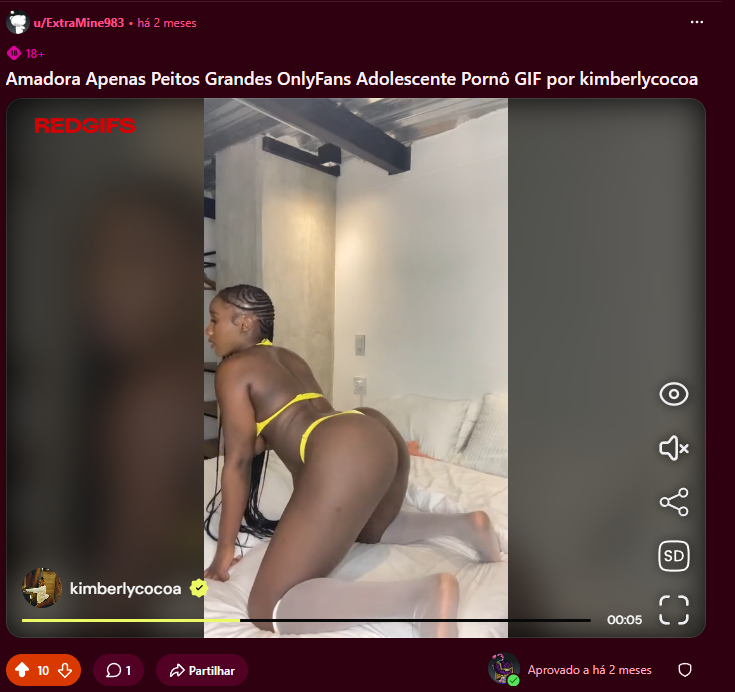
1. Find the post containing the video or image you want to download
Navigate through Reddit and locate the target post. For our tutorial, we will use the following post as a typical example of content you might want to download:
2. Copy the shareable link of the post
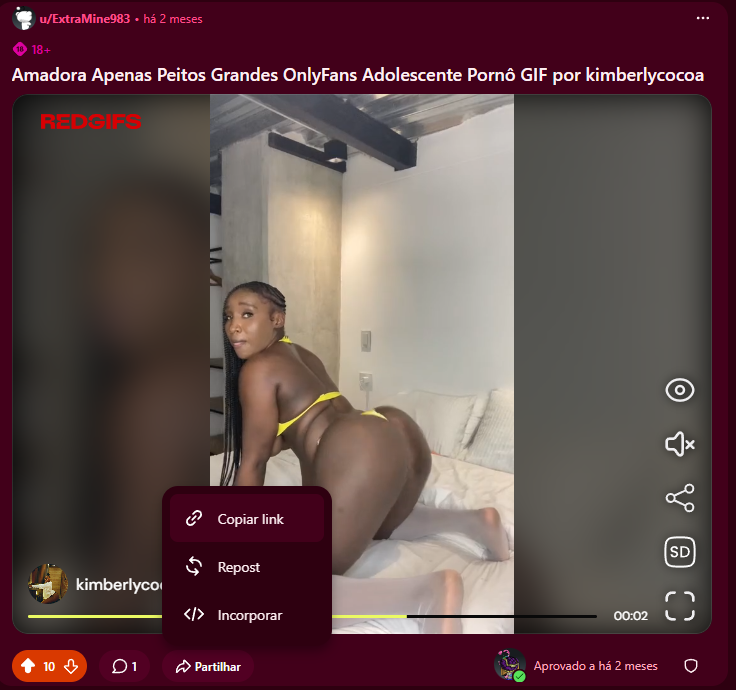
For RedditDownloader to find the media on Reddit's servers, you must provide the specific URL (the web link) of the post. To do this:
- On Computer (Desktop): Click the "Share" button located right below the post and select "Copy Link". Alternatively, you can copy the full URL directly from your browser's address bar.
- On Mobile (App): Tap the "Share" button below the image or video, then tap "Copy Link".
The image below highlights the share button and where you can grab your link:
3. Paste the link into RedditDownloader.com and search
With the link copied to your clipboard (Ctrl+V on desktop or hold down on your mobile screen to paste), follow these quick steps:
- Open your browser and head to redditdownloader.com.
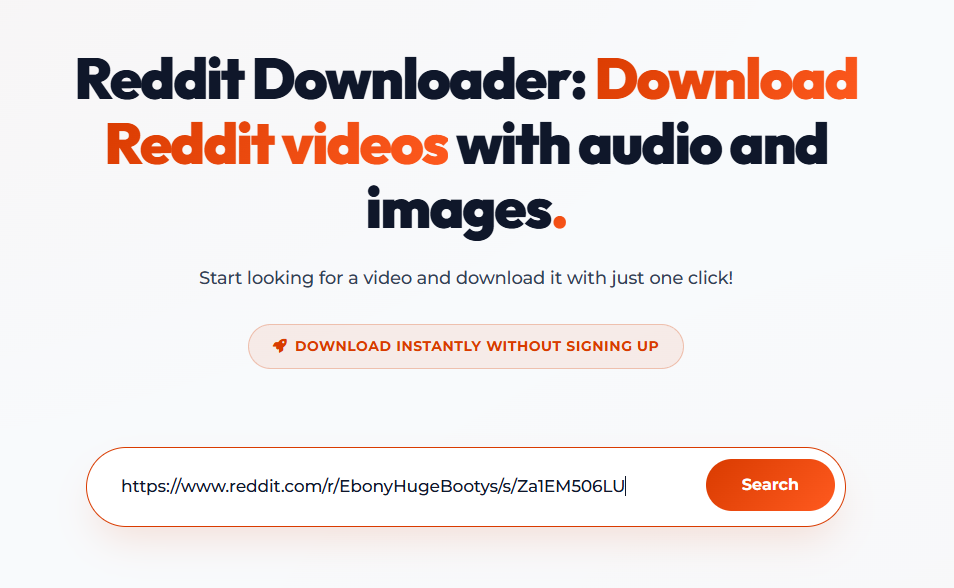
- Paste the link you just copied into the central search field that says "Insert Reddit Link" or similar.
- Click the Search button so our system can safely fetch the media from the post.
See how clean and simple the search input field is in the illustration below:
4. Download your generated media
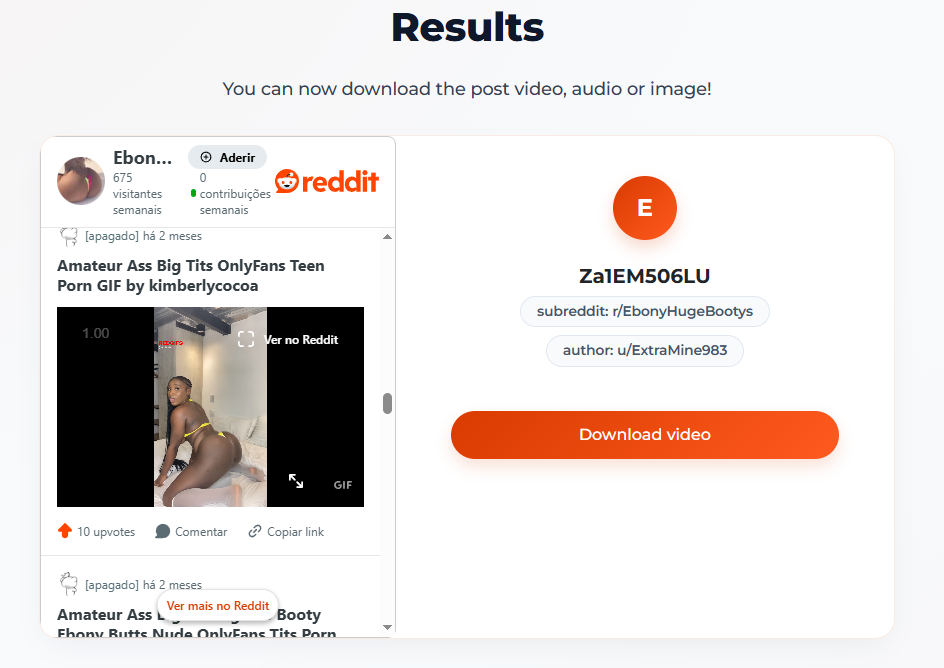
After clicking Search, our system will process the Reddit post in just a few seconds. It will locate the highest available video resolution, combine it with the original audio track, and display a result card containing the media thumbnail and saving options.
All you need to do now is click the Download button on the result card to save the file directly to your device. It is that simple!
Part 5: Extra Tips to Discover the Best Content on Reddit
Now that you have mastered downloading, how about optimizing your browsing to find the best original media the web has to offer? Here are some golden tips for finding top-tier content on Reddit:
1. Filter Posts by Time and Relevance
When you enter any subreddit, by default you will see posts sorted by "Hot" (posts getting a high volume of upvotes right now). However, you can change this filter to find historic content or the absolute funniest posts. The most useful sorting filters are:
- New: Displays posts in real-time as they are published by users. Great if you want to leave the very first comment on a rising post.
- Top: Sorts posts by the highest number of upvotes. You can choose a time range: "Top of the week," "Top of the month," or "Top of all time." If you just joined a new community, filtering by "Top of all time" is the fastest way to view its best ever memes and discussions.
2. Check Out These Media-Focused Communities
If your goal is to spice up your group chats with mind-blowing videos or stunning photos, here are a few recommended subreddits you should check out:
| Subreddit Name | What You Will Find There | Best Suited For Downloading |
|---|---|---|
| r/InterestingAsFuck | Incredibly fascinating things from around the world (science, nature, exceptional human skills). | Mind-boggling videos and visual trivia. |
| r/NatureIsFuckingLit | Wildlife in all its glory, animals hunting, exotic landscapes, and wild natural phenomena. | High-resolution nature videos and photos. |
| r/Unexpected | Funny or intriguing videos that start normally but end with a completely unexpected plot twist. | Short, shareable clips perfect for status and story updates. |
| r/EarthPorn | Don't let the name scare you! It's a popular internet slang term for breathtaking, professional-grade landscape photography of Planet Earth. | Gorgeous wallpapers for your phone or computer. |
3. Respect Content Creators
Reddit is built on a culture of authorship and giving credit. When you download images and videos using RedditDownloader to share on other social media platforms, try to mention the original creator whenever possible. Many artists and creators post their work on Reddit to gain exposure and find new work.
Frequently Asked Questions (FAQ)
Is RedditDownloader.com free?
Yes! Our service is 100% free and unlimited. You can download as many videos, GIFs, and photos as you want without paying a single cent.
Do I need an account on RedditDownloader to save files?
No. We value your privacy and time. You do not need to register, create an account, or log in to use our media extractor.
Do downloaded videos include sound?
Yes, absolutely. Unlike outdated tools or manual workarounds that export muted videos, RedditDownloader's algorithm automatically merges the video and audio tracks, giving you a complete file with original high-quality audio.
Can I use this site on my Android phone or iPhone?
Yes, our website is fully responsive and optimized for mobile browsers (including Safari, Chrome, Firefox, and Opera). Copying links from the official Reddit app and pasting them into our site works seamlessly on touchscreens.
Is using RedditDownloader safe?
Yes. The media is fetched directly from Reddit's content delivery networks to your device. We do not require you to install any software, browser extensions, or third-party apps, keeping your computer or smartphone completely safe from malware and viruses.
Conclusion
Reddit is an infinite ocean of entertainment, knowledge, and creative content. Now that you understand how the platform works, know how to locate your favorite communities, and—most importantly—possess the knowledge to save any media from the site easily with RedditDownloader.com, your online experience will be elevated.
Don't let those hilarious clips, valuable video guides, or breathtaking artworks disappear down your feed. Whenever you spot something amazing, copy the link, head to our homepage, and save it directly to your storage to enjoy anytime, anywhere, even when you are offline. Happy exploring!